








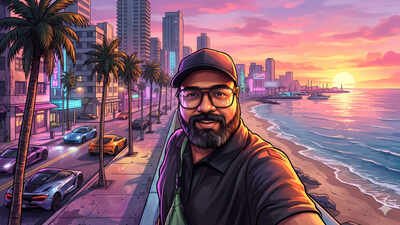
With GTA 6 dominating timelines, social media feeds are filling up with AI-edited portraits that turn ordinary selfies into neon-soaked Vice City posters. The edit is built around palm-lined streets, exotic sports cars, heavy contrast and Rockstar-style cover art framing. It makes a casual phone snapshot look like it was pulled straight from a game box. The good news is that you don’t need high-level editing skills or a custom illustration for this. All you need is a sharp portrait, an AI image generator and a well-worded prompt. Google Gemini and ChatGPT make the process quick and even give you extra room to tweak the artwork.
What is the GTA 6 AI photo trend
Anyone who has spent time with the Grand Theft Auto series will recognise the look right away. Classic Rockstar promotional art leans on bold ink-style outlines, painted highlights, saturated sunset skies, neon signage and busy coastal avenues. The AI trend borrows these same ingredients and wraps them around your face. You can go for the traditional cel-shaded cover look or the newer photorealistic “real-to-GTA” in-game screenshot style.
Things to check before sharing
AI-generated portraits can sometimes change small details such as fingers, jewellery and text in the background. Check the finished image before posting it. Avoid uploading photos that show sensitive material. Do not transform pictures of people who have not agreed to it.
GTA 6 AI-prompts: How to make a GTA-style portrait in Google Gemini
Gemini is one of the fastest ways to restyle an existing photo without losing your likeness. Follow these steps.
- Open Google Gemini: Go to the Gemini website or open the mobile app, sign in with your Google account and start a new chat with image creation enabled.
- Upload a clear photo: Tap the attachment icon and pick a portrait from your camera roll or computer. Front-facing shots in even lighting work best. Avoid heavy shadows, so the model has clear facial features to preserve.
- Paste a detailed GTA-style prompt: Instead of typing a vague one-liner, spell out the lighting, framing and art direction. Copy and paste these prompts along with your photo:
Prompt 1:“Transform my uploaded selfie into a cinematic vertical portrait for an Instagram story, premium open-world video-game promotional illustration inspired by GTA VI…”Prompt 2:“Turn the uploaded photograph into a high-quality open-world crime video game poster inspired by the visual aesthetic of Grand Theft Auto. Keep the person’s facial features, hairstyle, expression and overall identity recognisable without beautifying or altering their face. Give the image a bold illustrated appearance with sharp outlines, vibrant colours, dramatic cinematic lighting and a detailed Vice City-inspired coastal backdrop. Include luxury sports cars, palm trees, neon-lit urban streets and a glowing sunset sky. Use a stylish video game poster composition with rich textures and no text or logos.”If you want a different vibe, swap the sunset beach strip for a rainy downtown alley, a rooftop helipad or a classic wanted-poster frame.
- Generate and fine-tune: Send the prompt and wait a few seconds for Gemini to render the image. If the first result drifts too far from your face or looks too dark, reply in the chat with a quick adjustment. For example: “Keep my facial features closer to the original photo and brighten the pink and orange sunset tones.”
- Save and post: Download the finished image to your device. It works well as a WhatsApp DP, an Instagram carousel slide or a lock-screen wallpaper.
Try the same trend in ChatGPTYou can also use ChatGPT for this. A GTA VI transformation prompt can turn your selfie into a cinematic vertical portrait for an Instagram story. The idea is a premium open-world video game promotional illustration inspired by GTA VI.
Quick tips for cleaner results
- Start with a sharp portrait as blurry selfies or distant full-body shots make it harder for AI models to hold on to your likeness.
- Lock in your facial features and tell the generator clearly not to beautify or replace your face, so you don’t end up looking like a generic stock character.
- Set the time of day, such as golden hour and neon-lit nights create the strongest GTA atmosphere.
- Inspect the edges, for example, check hands, sunglasses and background cars for warped details before you hit share.